Built for gambling creators

Run your stream like a real platform, not a spreadsheet

WagerFlow is the engine behind bonus hunt tracking, giveaways, live stream overlays, and Discord/Kick integrations — packaged under your own brand, your own domain, your own colors.

Get In Touch See what's included
Bonus Hunts
Giveaways
Live Overlays
Spotify + Song Requests
Discord + Kick
Your Own Brand
Everything included

One platform, every tool your stream needs

Not a mockup. Every screen below is the real product, running on a real stream.
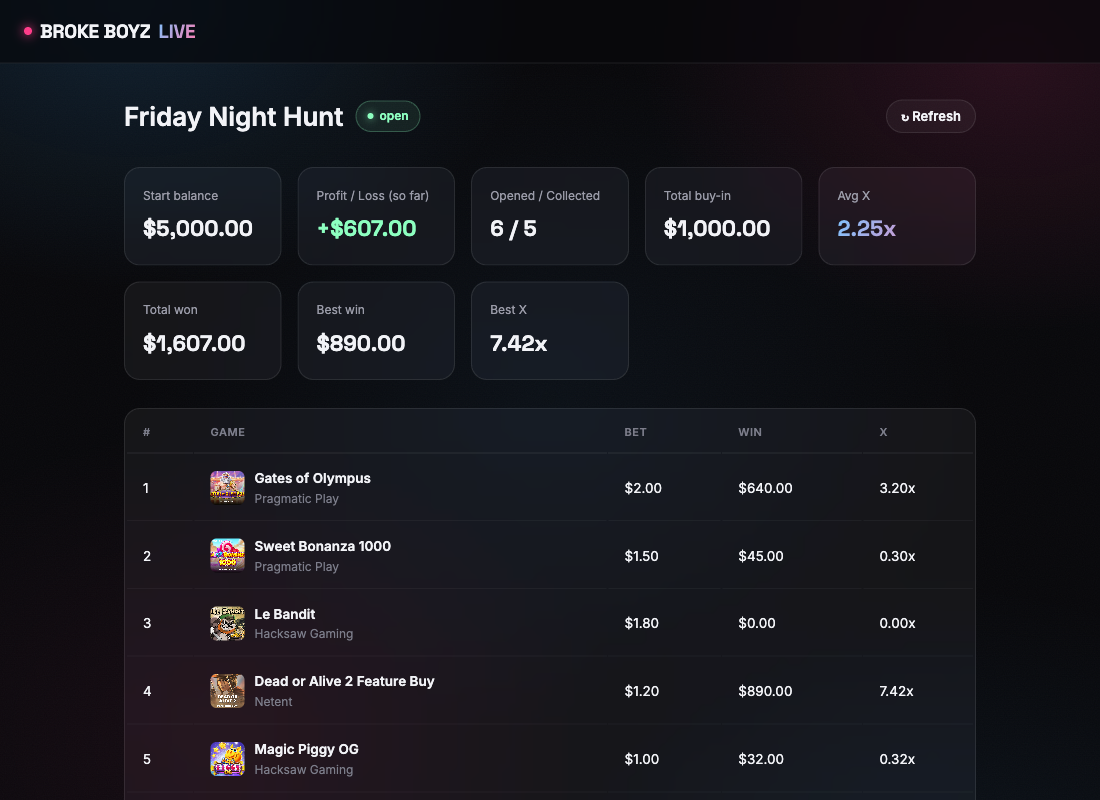
brokeboyzlive.com/hunt/16
Live bonus hunt tracker showing buy-in, win, and multiplier for each slot in the hunt
Live on your stream

Every buy, win, and multiplier — tracked in real time

Log buys and wins as you play and the running P&L updates instantly, for you and your viewers. No spreadsheet tab to alt-out to, no manual math between spins.

  • Best win and average multiplier calculated live
  • A public hunt page your viewers can follow along on
  • Manual entry or provider-synced balance tracking
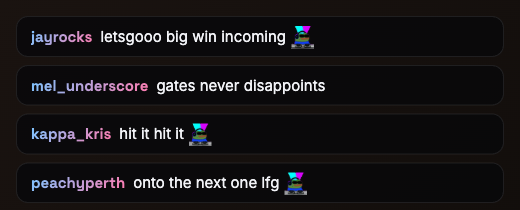
OBS Browser Source — chat overlay
Live chat overlay composited on stream, showing real Kick emotes rendered inline in chat messages
Composited straight into OBS

A branded stream bug, chat, and alerts — no design work needed

A branded stream bug, goal bar, alert box, and live chat overlay drop into OBS as plain browser sources. Kick emotes render inline in chat exactly as your viewers see them, not stripped out as text.

  • Real Kick emotes rendered inline, not stripped
  • Fixed-width bug so your OBS scaling never shifts
  • Just a browser source URL — no OBS plugin required
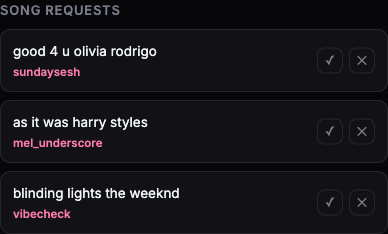
OBS Browser Dock — song requests
Song request queue on the OBS dock, showing viewer-submitted requests with approve and dismiss buttons
Chat commands, real Spotify

Viewers request the song, you push it in one click

A chat command turns any message into a request that lands on your OBS dock. Approve it and it goes straight to your live queue or a playlist — no alt-tabbing to Spotify mid-stream.

  • Configurable command, with a simple on/off toggle
  • Push straight to your queue, or a chosen playlist
  • A spinning-disc "Now Playing" bar updates on its own
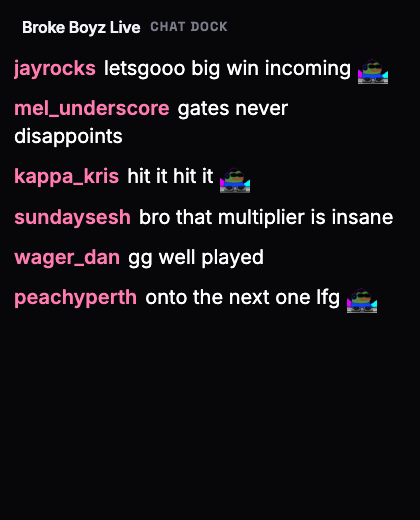
OBS Browser Dock — chat
Large-text chat dock built for the streamer's own OBS editor view
Built for the editor, not the broadcast

See what's happening without leaving OBS

Custom browser docks sit inside OBS itself — big-text live chat so you're never squinting at a corner of the screen, plus viewer count and connection health at a glance.

  • Large, high-contrast text built for a glance mid-stream
  • Live Discord & Kick connection status
  • Auto-scrolling, dark mode by default
Also included — Wheel & game picker·Giveaways engine·Discord & Kick auto-announce·Your own brand, top to bottom
Who it's for

Built for the people actually running the stream

If any of this is your Tuesday night, WagerFlow was built for you.

🎥

Solo casino streamers

Running bonus hunts and giveaways off a laptop and a spreadsheet, ready for something that actually looks like a real production.

🧑‍🤝‍🧑

Streamer collectives

Multiple creators sharing one community, one Discord, and one set of tools — without stepping on each other's setups.

🏢

Venues & brands going live

Clubs, casinos, and creator networks that want a real branded presence around their live content, not a bolted-on afterthought.

How it works

Up and running in three steps

1

We set up your space

Your own creator account on WagerFlow, ready to configure — no self-serve signup, we onboard every creator directly.

2

Connect Discord & Kick

Link your own Discord server and Kick channel in a couple of clicks. Nothing to install, nothing to self-host.

3

Make it yours

Set your colors, drop in your logo, point your own domain at it if you've got one. Go live.

Want WagerFlow running your stream?

Every creator on WagerFlow is set up directly — reach out and we'll get you sorted.

Get In Touch